A talking head video features a person speaking directly to the camera, with their face and upper body as the main focus. Thanks to its personal and engaging format, it is widely used for educational content, business presentations, product marketing, tutorials, social media videos, and other communication needs.
However, filming yourself and editing the footage can be time-consuming, and it may feel challenging for those who are uncomfortable being on camera. The good news is that AI-powered tools make the process easier than ever. In this complete guide, we’ll show you how to create engaging talking head videos with AI—no complicated setup required. Ready to get started? Let’s dive in!
Also Interested in: PodCast Video Makers to Generate PodCast Videos That Get Likes>>
The Only Tool You Need to Create Talking Head Videos
Looking for a faster and easier way to create talking head videos? FlexClip’s AI-powered talking head video genereator simplifies the entire process. Just enter your script, and the AI avatar tool will transform it into a realistic talking video—no camera, filming, or complicated editing needed. Select from 140+ AI presenters across various ages, styles, and backgrounds, or create your own digital twin with a custom avatar. FlexClip makes professional talking head video creation effortless for everyone.
AI Avatar Generator to Create Talking Head Videos in FlexClip
Prefer to record yourself but want to simplify the editing process? FlexClip also gets you covered. Its text-based video editor lets you edit videos just like editing a document—quickly remove mistakes, filler words, and unwanted pauses without manually scrubbing through footage. Enhance your videos with AI-powered tools, including automatic subtitles, AI-generated music, and more, to achieve a professional look in minutes. No editing skills needed—just choose your creation method and bring your ideas to life with FlexClip.
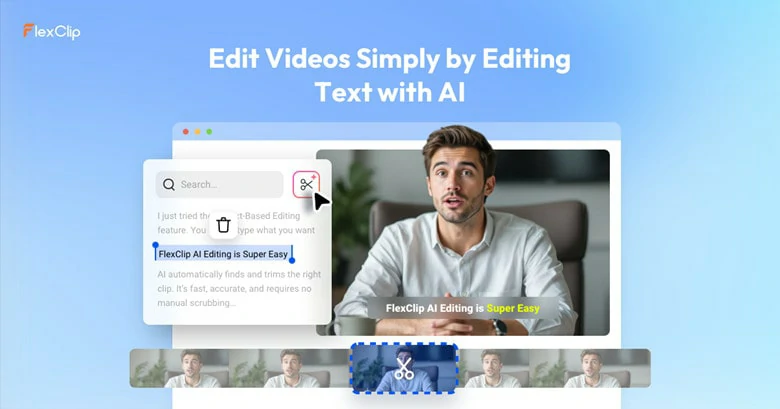
Text-based Video Editor for Head Talking Video Editing
How to Create a Talking Video with FlexClip
Creating talking videos with an AI avatar is the easiest way to bring your ideas to life. Just enter your script, and your digital avatar will automatically generate a realistic talking video with accurate lip-syncing, natural expressions, and smooth movements—saving hours of recording and editing time. No camera setup or repeated filming is needed, and your avatar’s appearance remains consistent across every video. Ready to create your own AI talking video? Let’s get started!
Step 1: Pick an Avatar or Create Your Custom One
First, choose the digital avatar that best fits your needs. FlexClip provides 140+ AI avatars with diverse professions, ages, styles, and genders for a quick start. You can also upload your own photo or video to create a personalized AI avatar that matches your appearance and voice. No matter which option you choose, you can generate your avatar quickly and easily.
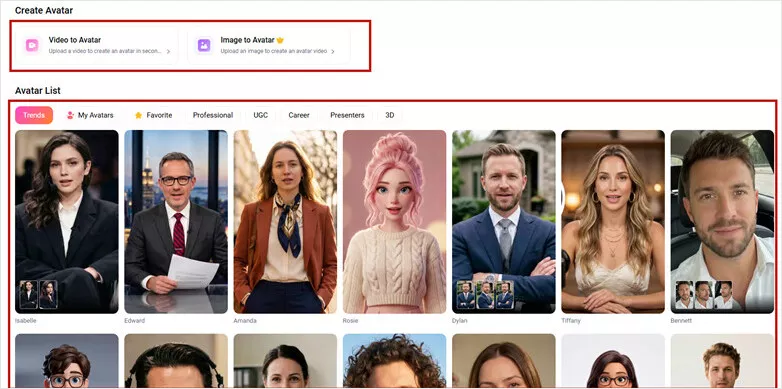
Pick or Create Your Own Avatar
Step 2: Enter Your Script to Let Avatar Dub
With your AI presenter ready, simply enter your script and select the perfect voice from 3,400+ AI voices to match your content style and tone. You can also upload your own audio, and FlexClip will transform it into a realistic talking video by automatically syncing your avatar’s lip movements with the voice. Create natural, engaging presenter videos without recording yourself.
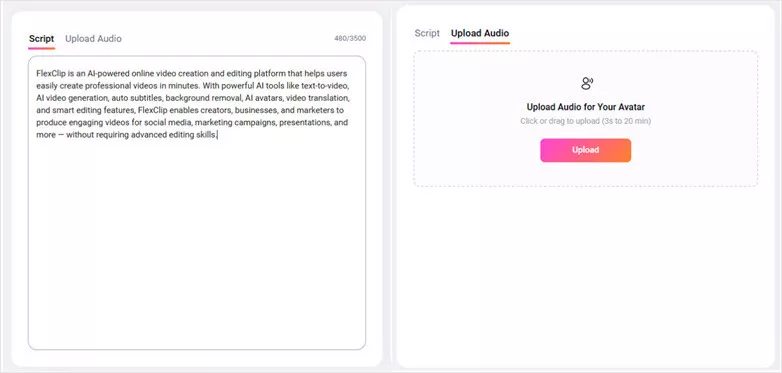
Enter Your Script to Let Avatar Dub
Step 3: Generate AI Talking Head Video
Personalize your video by adjusting the aspect ratio, subtitles, background, and other settings to fit your needs. Once everything is ready, simply click “Generate.” In minutes, FlexClip will create a realistic talking video featuring natural lip-syncing and expressive gestures, ready for download and use.
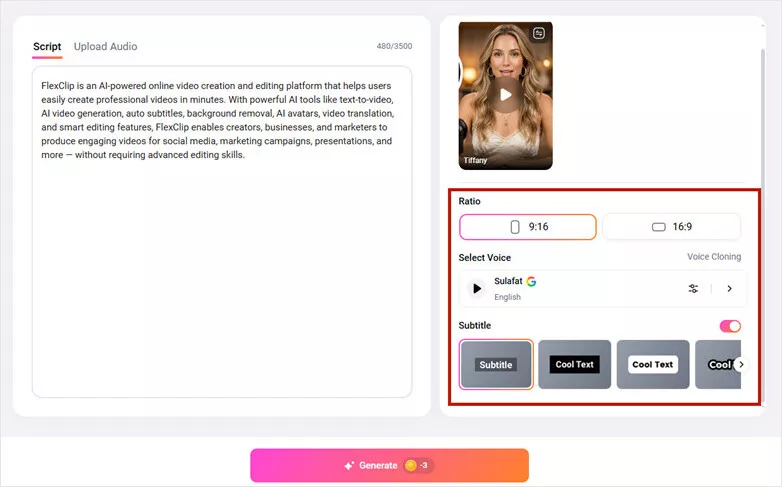
Generate AI Talking Head Video
How to Edit a Talking Video with FlexClip
Already finishing the talking head video recording but need an efficient way for editing process? No worries! With FlexClip's text-based editing tool, taking your talking head videos to the next level is just a few clicks away. Here's how to do:
Step 1: Upload Your Raw Recording
Go to FlexClip’s AI text-based editing tool and upload a video from your computer.
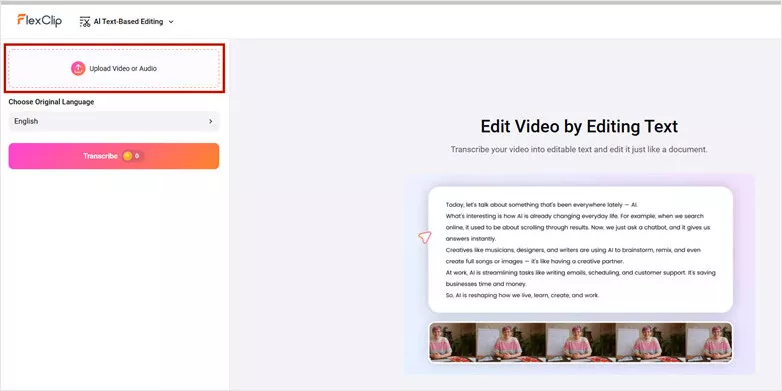
Upload Your Raw Recording
Step 2: Transcribe and Edit Your Talking Head Recording
FlexClip automatically transcribes your spoken content into editable text, allowing you to edit your video as easily as editing a document. Simply delete unwanted sections or remove filler words from the transcript, and FlexClip will automatically cut those parts from your video to create a cleaner, more polished soundtrack. You can also highlight key moments from your footage and refine your content effortlessly.
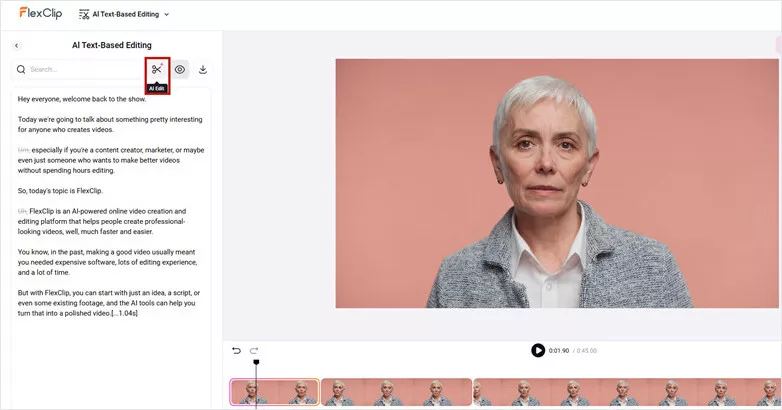
Transcribe and Edit Your Talking Head Recording
Step 3: Export or Continue Edits
Once your talking head video is ready, export it instantly for sharing or bring it into FlexClip’s built-in video editor to add your personal touch. Enhance your video with captions, music, effects, and more to create a professional result that stands out.
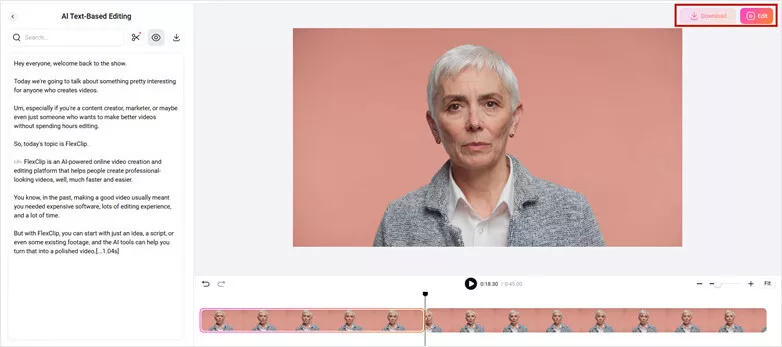
Export Your Edited Talking Video or Continue Edits
Two More AI Talking Head Video Generators for You
In case you want more AI-powered options to create engaging talking head videos, here we recommend two more AI talking head video generators to you.
Synthesia
As a pioneer in AI talking-head videos, Synthesia is one of the most recognized AI video platforms, enabling users to create professional-looking presenter videos by simply typing a script instead of recording themselves on camera.
With 240+ AI avatars, Synthesia allows users to create engaging videos featuring diverse digital presenters across different ages, appearances, and styles. For businesses looking to produce training, marketing, onboarding, or educational content, Synthesia is a reliable choice for creating polished talking-head videos quickly and efficiently.
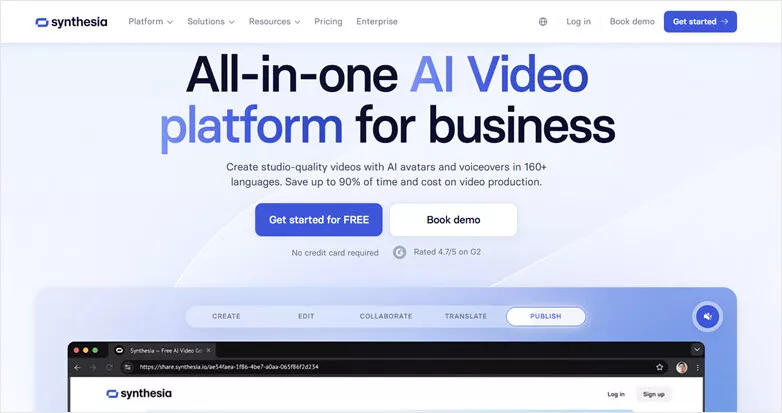
Leading Talking Head Video Generator - Synthesia
DeepBrain AI
DeepBrain’s AI Studios makes it easy to create professional presenter-style videos with realistic AI avatars. Simply add scripts, documents, or presentations, and DeepBrain transforms your content into engaging videos without the need for cameras, actors, or recording equipment.
The platform offers 2,000+ AI-generated avatars across various appearances, styles, and professions, along with 125+ Studio Avatars based on real actors, providing flexible options to meet a wide range of video creation needs. It's best for realistic presenters, news-style videos and enterprise content in talking head form.
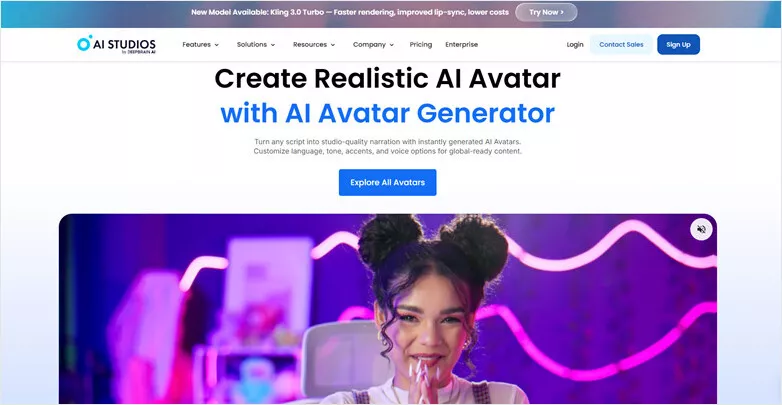
Popular Talking Head Video Generator - DeepBrain AI
Frequently Asked Questions About Talking Head Videos
1. What is a talking head video?
It's a video format that focuses on a person speaking directly to the camera, usually showing their face and upper body. It is commonly used for tutorials, online courses, product reviews, business presentations, interviews, and social media content.
2. Can I create a talking head video without a camera?
Yes. AI talking head video generators allow you to create presenter-style videos using AI avatars. You can simply enter a script, choose an avatar and voice, and generate a video without recording yourself.
3. How to edit my recorded talking head videos?
To edit talking head recording quickly and cleanly, you can try AI-powered tools to remove dea air and silences, cut out mistakes or filler words and add b-rolls for engaging results.
4. Can I turn a presentation into a talking head video?
Yes. You can try an AI talking head video generator like FlexClip to convert slides, documents, or scripts into presenter-style videos by adding AI avatars, voiceovers, captions, and animations.
Tips to Make Great Talking Head Videos
Below are some of the tips you need to come up with a talking head video that works. Please follow.
1. Focus on the Outcome
You have to visualize the outcome of the video even before you start shooting. Visualize what the audience will think about it, and see the video in the eyes of the audience even before you get on with it. Which that in mind, you will be able to make a better decision on how to pull it off – you will get to know which tool to apply and how to apply them.
2. Use Enough Lighting
In this art, the quality of video production matters a lot. And to do that, you need enough light to bring out the needed brightness in the video. To succeed in this, don't let the light go too close or far from the speaker. You have to watch closely from the camera; that's the only way you can get to know when there is enough light to light up the studio.
3. Get the Right Set Design
Talking head videos can easily get boring at a point; there are not many things to see in such video format, only the head and shoulders of the interviewed. So, to make it right, have a nice-looking background, and make the content as interesting as possible. That way, the viewers will have something to stay glued to.




FlexClip AI Video Maker
Reach professional-quality videos faster with easy editing tools, templates, and smart AI.
Start Now for Free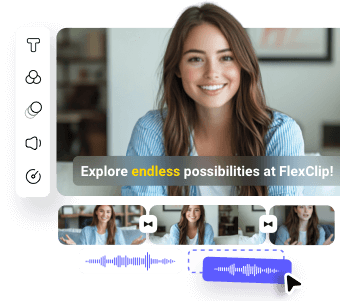
Hot & Trending
-
Best Ways to Find Music in YouTube Videos
-
Instagram Story Video Quality Bad After Upload? Fix It!
-
How to Repost Video on TikTok & How to Remove TikTok Repost
-
Improve Video Quality Online: 3 AI Video Quality Enhancers You Can't Miss
-

4K Convert to HD 1080p without Watermark: Best 4k Video Converters
-

Best 8 Free Video Editors - No Download Required
-
Top 13 Birthday Video Makers with Music and Effects Free
-
How to Search Filters on TikTok & Use a Filter You See - TikTok Filter Guide